
The painfully detailed guide to getting started with the cTrader Affiliate Program
Learn how to join the cTrader Affiliate Program, create your first affiliate link and start promoting Store products with this step-by-step guide. From setting up your Impact account to tracking clicks and commissions, we'll walk you through every stage with no skipped steps.
Recently, we shared the first cTrader Affiliate Program success story, where one seller generated more than $3,000 in product sales through affiliate links in just two weeks. Want to achieve similar results? This guide will walk you through every step of getting started, from creating your Impact account to generating your first affiliate link. No skipped steps, no assumptions and no prior experience required.
 Sofia Savchenko
Before we start
Let’s get one thing out of the way.
The cTrader Affiliate Program isn't difficult. It just involves a few unfamiliar steps the first time you go through them. Once your account is set up, creating new affiliate links takes less than a minute.
This guide focuses on exactly one goal: helping you create your first affiliate link.
By the end of this article, you’ll know how to:
- create an Impact account;
- join the cTrader Affiliate Program;
- generate your first affiliate link;
- test it;
- publish it;
- track your results.
Let’s begin!
 Sofia Savchenko
Step 1. Create your Impact account
The cTrader Affiliate Program is managed through Impact, the platform that handles affiliate tracking, reporting and commission payments.
To get started:
- Open the cTrader Affiliate Program page.
- Click Apply via Impact.com.
- You'll be redirected to Impact.
- Select the option to create a Publisher account.
- Enter your email address and create a password.
- Verify your email if prompted.
Don't worry if you don't have thousands of followers or a huge website.
Many successful affiliates started with a small audience and simply shared useful content consistently.
Step 2. Complete your publisher profile
Once you've created your account, Impact will ask you to complete your profile.
Take a few minutes to fill in the requested information.
Depending on your account, you may be asked for:
- your website;
- YouTube channel;
- Telegram community;
- social media accounts;
- company information;
- payment information;
- tax information.
Don't panic if you don't have every possible channel.
Simply provide the information that applies to you.
Step 3. Apply to the cTrader Affiliate Program
Now it’s time to join the programme itself.
Inside Impact, find the cTrader Affiliate Program and click Apply.
There’s no need to overcomplicate your answers.
After submitting your application, its status will change to Pending while it’s being reviewed.
Step 4. Wait for approval
Once your application has been approved, you’ll gain access to the programme inside Impact.
From this point onward, you’ll be able to:
- generate affiliate links;
- access promotional assets;
- view reports;
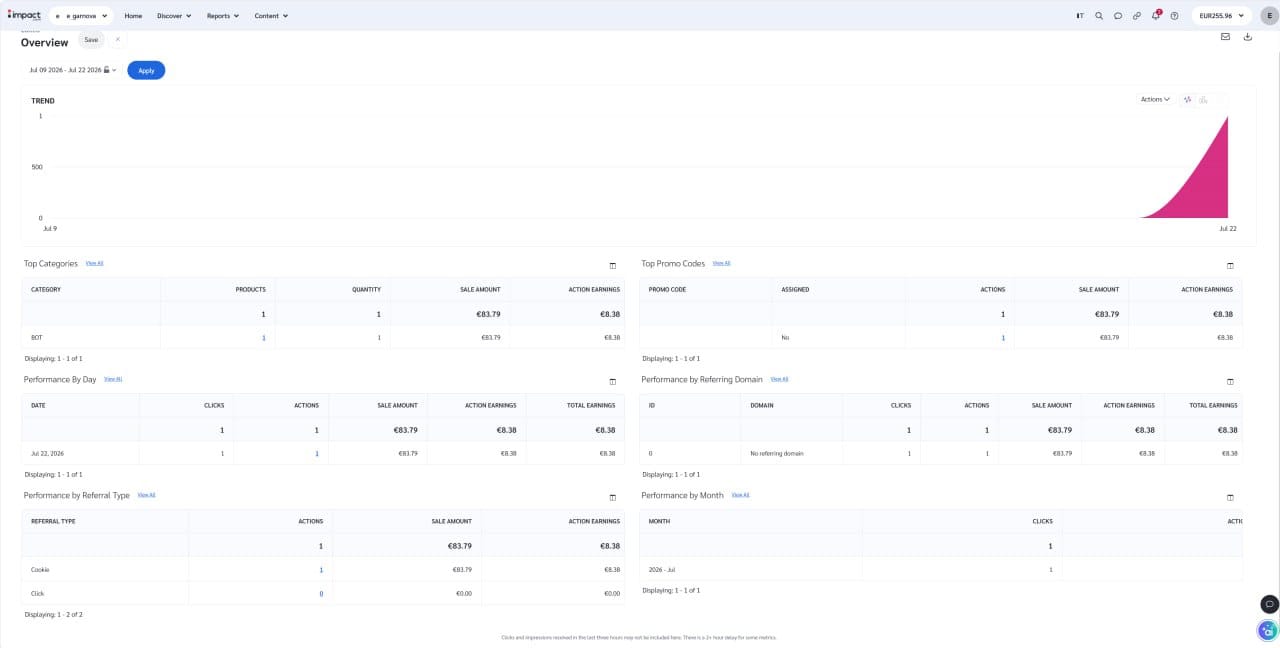
- monitor clicks and conversions.
Congratulations—you’ve completed the hardest part already.
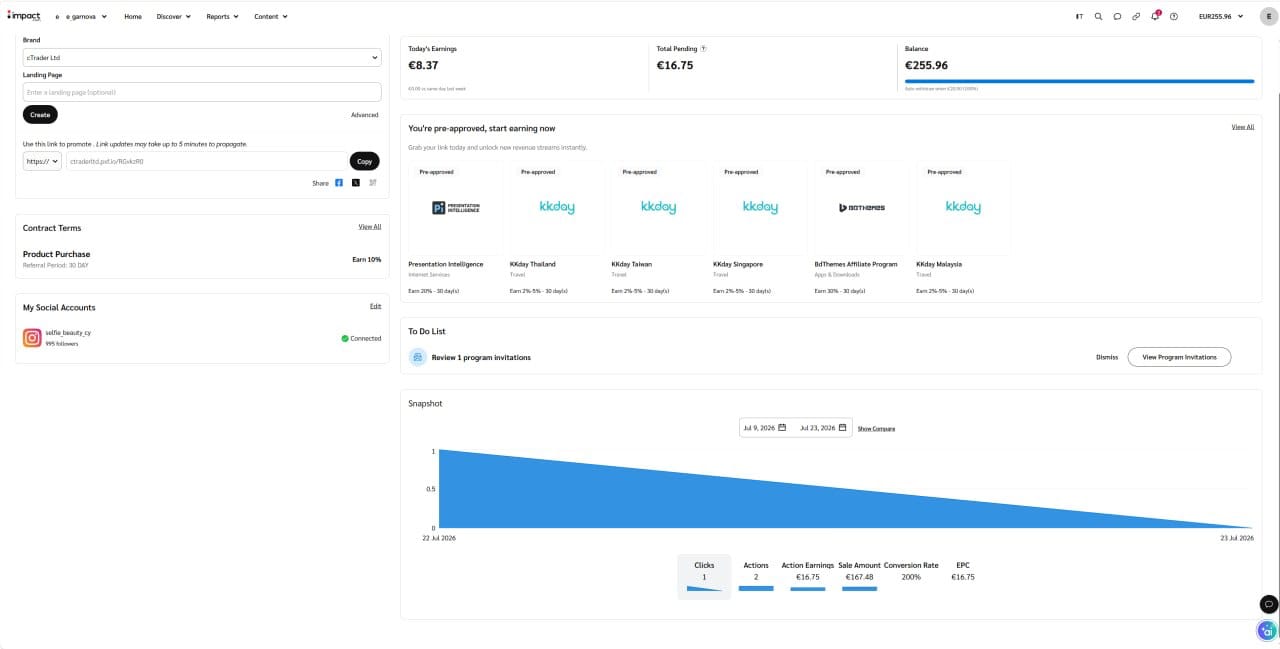
Step 5. Get familiar with the dashboard
The first time you open Impact, it can feel a little overwhelming.
You’ll see plenty of menus and reports.
The good news?
You only need a few sections to get started.
The ones you’ll use most often are:
- Dashboard
- Assets
- Reports
Ignore everything else for now.
You can always explore the advanced features later.
Step 6. Create your first affiliate link
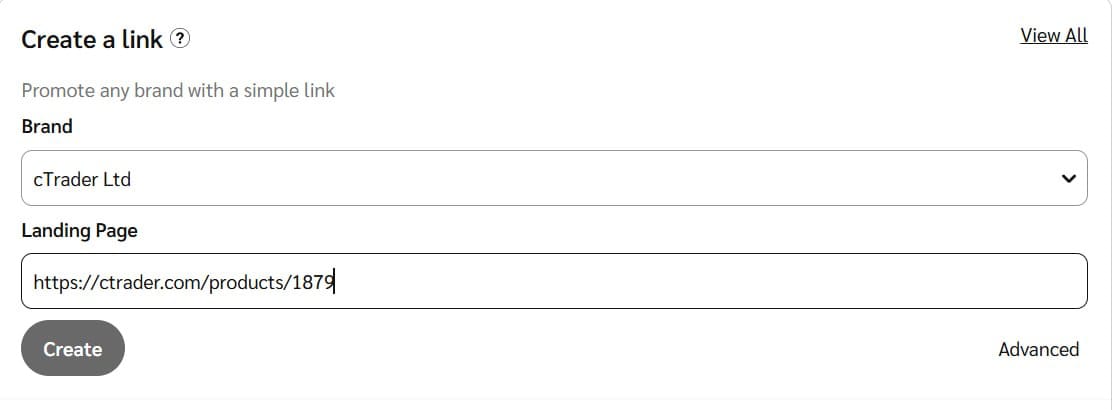
This is the step you’ve been waiting for.
Open the programme dashboard and navigate to the link creation tool.
Paste the Store page you want to promote.
This could be:
- a trading bot;
- an indicator;
- a plugin;
- a seller profile;
- or another Store page.
Click Create Link.
Impact will instantly generate a tracking link that contains your affiliate information.
Copy it.
That’s your affiliate link.
Step 7. Test your link
Seriously. Don’t skip this step.
Open your new affiliate link in an incognito or private browser window.
Check that:
- the correct page opens;
- there are no errors;
- the redirect works properly.
Testing takes less than thirty seconds.
Fixing a broken campaign after hundreds of visitors clicked the wrong link takes considerably longer.
Step 8. Start sharing your link
Now your affiliate link is ready. The question becomes: Where should you publish it? The best answer is simple. Wherever traders already consume your content.
Some popular options include:
- your website;
- blog posts;
- YouTube descriptions;
- Telegram communities;
- Reddit;
- Discord;
- LinkedIn;
- X;
- educational articles.
The highest-performing affiliate links usually don’t feel like advertisements.
Instead, they naturally appear alongside genuinely useful content.
For example, if you’re reviewing a trading bot, include the affiliate link where readers would naturally expect to find it.
If you’re writing a tutorial, link directly to the tool you’re discussing.
If you’re answering questions on Reddit, include the link only when it genuinely helps answer the original question.
Focus on being useful first.
The clicks will follow.
Step 9. Track your performance
After people start clicking your links, Impact will begin collecting data automatically.
You can monitor:
- clicks;
- conversions;
- commissions.
Checking these reports regularly helps you understand what content performs best.
You may discover that YouTube generates more conversions than Reddit.
Or that tutorials outperform product announcements.
The more you learn from your reports, the better your future content becomes.
Common beginner mistakes
Almost everyone makes at least one of these mistakes. Fortunately, they’re easy to avoid.
Sharing the original Store URL
Always share your affiliate link instead of the original page. Otherwise, your referrals won’t be tracked.
Forgetting to test the link
Always click your own link once before publishing it.
Posting links without context
People rarely click random affiliate links. They do click links that solve a problem or answer a question.
Linking to the Store homepage instead of a specific page
Rather than sending visitors to the cTrader Store homepage, link directly to the specific product or seller profile you're recommending. The fewer steps people have to take to find what they're looking for, the more likely they are to convert.
Trying to promote everything
Start with one or two products you genuinely know and recommend. It’s much easier to build trust that way.
What’s next?
You’ve officially completed the setup.
You have an account.
You’ve joined the programme.
You’ve created your first affiliate link.
You’ve tested it.
Now it’s time to do the part that actually makes the difference: create content traders find genuinely useful.
 Aisylu Chanysheva

Comments ()