

Compare cBots Faster on cTrader Store

Finding the right trading bot should not feel like guesswork.
That is why we have upgraded cBot product cards across cTrader Store — both on the storefront and inside each product page. The goal is simple: help traders understand what a bot does, compare products more easily, and start testing faster.
The best part: you do not need to rely on vague descriptions anymore. You can now scan, compare, and download trial versions to see how a product behaves in your own environment.

Do not guess. Download trial versions, compare products, and test smarter.
What is new on the storefront
The updated cBot listing page now gives traders more useful information before they even open a product page.
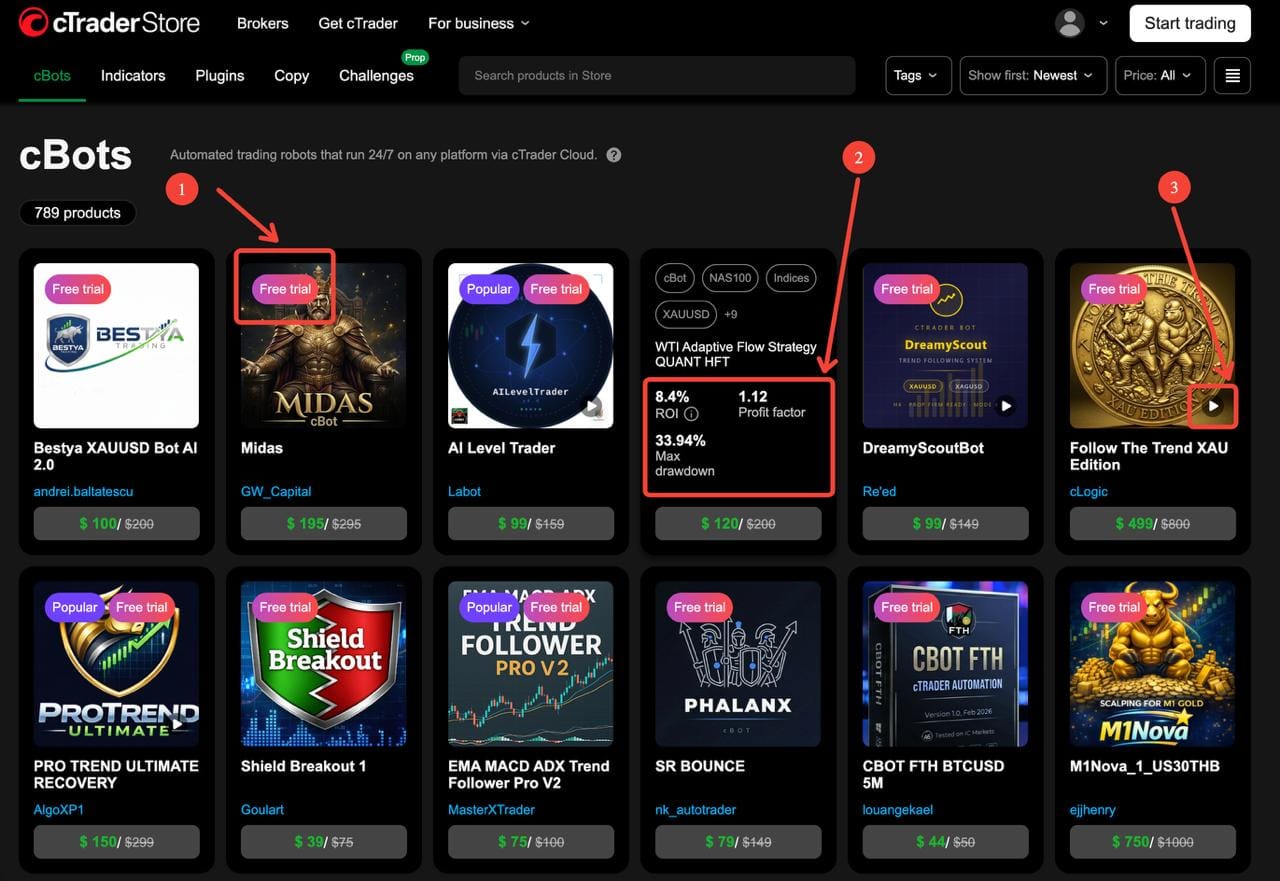
1. Free Trial badge
If a product offers a trial version, you will see it immediately on the card. This makes it easier to focus on bots you can test first, instead of buying blind.
2. Hover performance preview
When you hover over selected cBot cards, you can now see key performance metrics directly on the storefront. This helps you compare products much faster without opening dozens of tabs.
The preview can show:
- ROI — the return generated in the backtest shown by the seller
- Profit factor — the ratio of gross profit to gross loss
- Max drawdown — the largest peak-to-trough decline in the backtest
These three metrics do not tell the whole story, but they give a strong first signal about how aggressive, efficient, or volatile a strategy may be.
3. Video indicator
Cards can also show whether the seller added a video. That matters because a good demo video can help you understand the logic, workflow, UI, and expected setup much faster than text alone.
So now, right on the storefront, you can ask three practical questions before clicking:
- Can I test it?
- Does the performance profile look interesting?
- Did the seller include a video walkthrough?
That already makes shortlisting much easier.
Do not guess. Download trial versions, compare products, and test smarter.
What is new inside the product page
Once you open a cBot page, the new layout gives you a much clearer product snapshot.
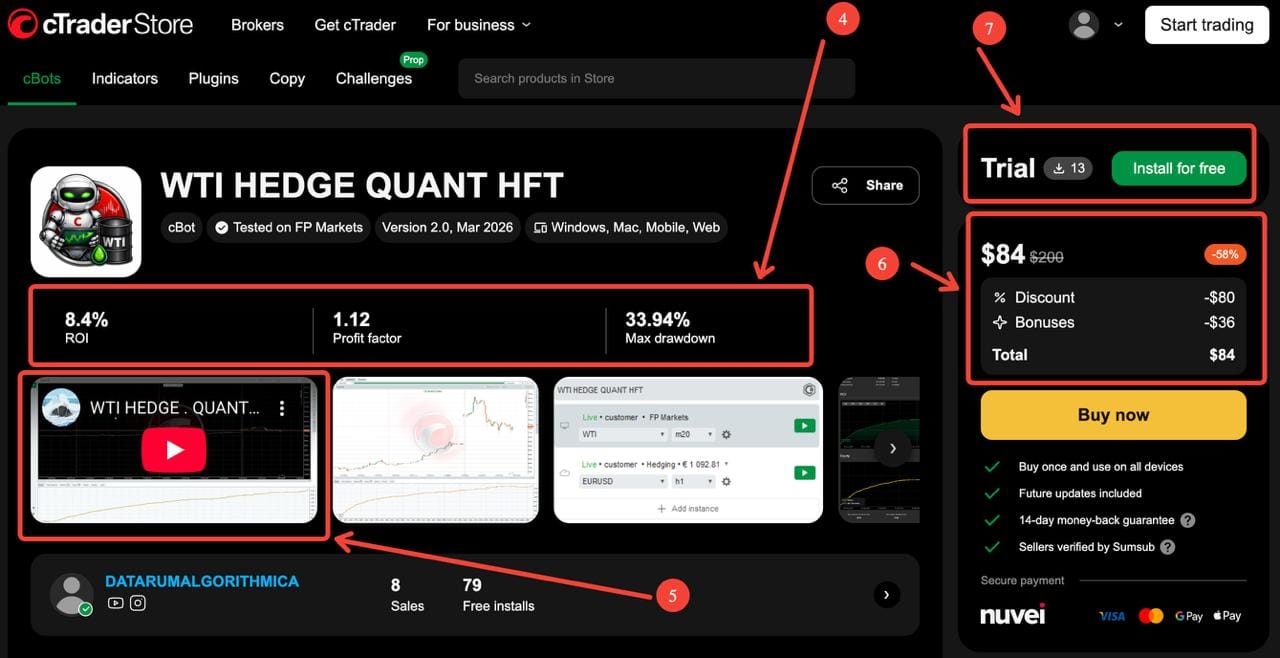
4. Performance snapshot at the top
The most important backtest metrics are now visible near the top of the product page:
- ROI
- Profit factor
- Max drawdown
This lets traders quickly judge whether a bot looks conservative, balanced, or aggressive before going deeper into the description.
5. Better product context and trust signals
The page also makes supporting information easier to evaluate, including:
- media gallery and video preview
- seller identity
- product version
- tested broker
- sales and free installs
This helps traders understand whether a product is new, actively maintained, widely tested, or already attracting interest.
6. Clearer pricing block
Pricing is easier to read, including:
- current price
- original price
- discount
- bonuses, where applicable
- total
That gives buyers a more transparent purchase view without having to calculate the real price manually.
7. Trial and install action
If a trial is available, it is now much easier to spot and use. Traders can go straight from evaluation to action: install the trial, test it, compare it, and only then decide whether to buy.
That is exactly how many traders prefer to shop for automation tools.
8. New Overview tab with structured trading profile
This is one of the biggest improvements.
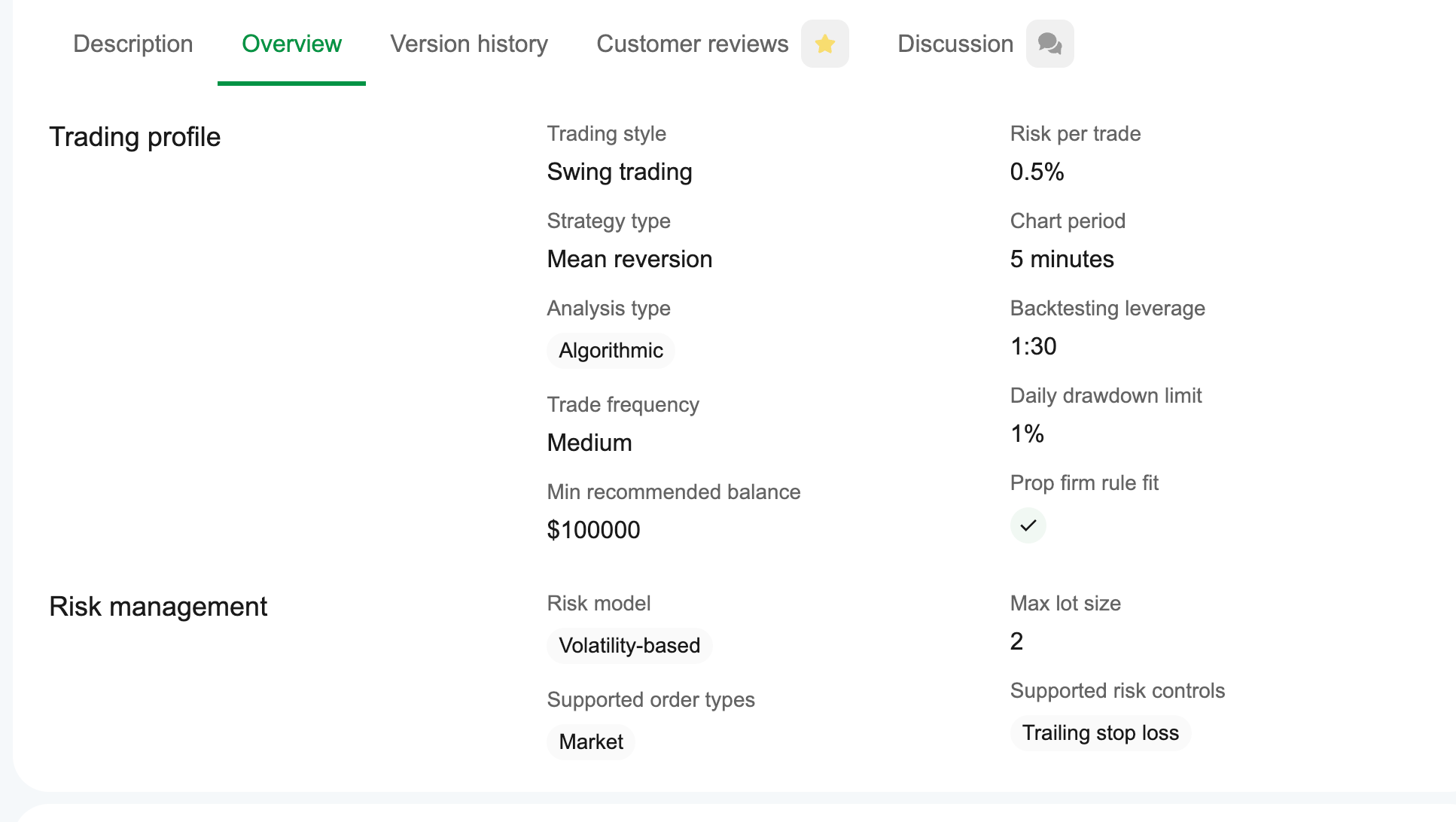
The new Overview tab helps traders understand what kind of strategy they are looking at without reading a long marketing paragraph first. Instead of guessing from the name or screenshots, users can now review a structured trading profile and risk-management summary.
This is where comparing cBots becomes much more practical.
Do not guess. Download trial versions, compare products, and test smarter.
How to read the new Overview tab
The Overview tab includes a structured breakdown of how a bot trades and how it manages risk. Here is what each field means.
Trading style
This describes the general pace and holding behavior of the strategy.
Possible examples include:
- Scalping — short holding time, frequent entries, fast reactions
- Day trading — trades typically opened and closed within the day
- Swing trading — longer holding periods, usually capturing broader moves
Why it matters: traders looking for fast intraday systems will not evaluate a swing bot the same way they evaluate a scalper.
Strategy type
This explains the core market logic behind the bot.
Possible examples include:
- Trend — follows directional moves
- Breakout — enters after price breaks key levels or ranges
- Mean reversion — looks for price to revert toward an average
- Arbitrage — attempts to exploit pricing inefficiencies
- Grid or grid-based logic — may scale into positions across levels
Why it matters: strategy type strongly affects expected behavior during trends, ranges, news, and volatility spikes.
Analysis type
This shows how the bot generates decisions.
Possible examples include:
- Algorithmic — automated rule-based execution
- Technical — based on indicators, price action, or chart structure
- Quantitative — uses statistical or model-based logic
Some products may combine multiple approaches.
Why it matters: it helps traders understand whether the system is mainly indicator-driven, mathematically filtered, or execution-focused.
Trade frequency
This indicates how often the bot is expected to trade.
Typical values may include:
- Low
- Medium
- High
Why it matters: frequency affects trader expectations around activity, commissions, slippage sensitivity, and psychological comfort.
Minimum recommended balance
This is the minimum account size suggested by the seller for using the strategy.
Why it matters: even a strong strategy may behave very differently if the account is underfunded relative to its risk logic, margin requirements, or scaling model.
Risk per trade
This shows how much account risk may be taken per position or setup.
Why it matters: a bot with a strong ROI but very high risk per trade may be unsuitable for conservative traders or funded-account environments.
Chart period
This refers to the timeframe the strategy is designed for, such as:
- 5 minutes
- 15 minutes
- 20 minutes
- 30 minutes
- 1 hour
- higher timeframes depending on the product
Why it matters: timeframe changes signal frequency, trade duration, and market noise exposure.
Backtesting leverage
This tells you what leverage was used in the presented backtest.
Examples may include:
- 1:30
- 1:100
- 1:500
Why it matters: leverage can significantly affect performance, margin usage, and survivability. Two bots with the same ROI may have very different leverage assumptions behind them.
Daily drawdown limit
When available, this shows whether the bot is designed with a daily loss cap in mind.
Why it matters: this is especially relevant for traders who prefer tighter risk discipline or want compatibility with certain funded-account rules.
Prop firm rule fit
This indicates whether the bot may be suitable for prop-style constraints or funded-account environments.
Why it matters: many traders want to know whether a system is more aligned with prop evaluation logic, especially around drawdown control and execution style.
Risk model
This explains how position sizing or risk is managed.
Possible examples include:
- Fixed lot
- Fixed risk percentage
- Volatility-based
Why it matters: a fixed-lot strategy behaves very differently from a volatility-adjusted strategy, especially across different balances and market regimes.
Supported order types
This shows which order types the bot can use.
Possible examples include:
- Market
- Limit
- Stop
- Stop-limit
Why it matters: order types affect execution logic, slippage exposure, and how the bot enters momentum or pullback setups.
Max lot size
This indicates the largest position size configured or supported in the strategy profile.
Why it matters: it helps traders estimate scaling behavior and whether the bot stays within their own risk tolerance.
Supported risk controls
This lists the protection mechanisms built into the bot.
Possible examples include:
- Stop loss
- Take profit
- Trailing stop loss
- Max drawdown limit
Why it matters: this is one of the fastest ways to judge how disciplined or flexible the strategy is.
In other words, the Overview tab turns a cBot page into something far more useful than a sales page. It becomes a comparison tool.
Do not guess. Download trial versions, compare products, and test smarter.
Why this matters for traders
Traders do not just want more products. They want better decision-making.
The new cBot cards help answer practical questions faster:
- Is this bot trial-friendly?
- What kind of strategy is it?
- How aggressive is the drawdown profile?
- Was it tested on a broker I recognize?
- Does it look suitable for prop-style rules?
- Does the seller explain the system clearly?
- Is this worth testing against other bots on my shortlist?
This makes the selection process faster and more transparent.
It also encourages a healthier workflow: compare first, install trial versions, observe behavior, then decide.
Four cBots that already show the new format well
Here are four examples from cTrader Store that already benefit from the updated layout.
WTI HEDGE QUANT HFT
WTI HEDGE QUANT HFT is presented as an algorithmic scalping/arbitrage cBot, tested on FP Markets, with Version 2.0 dated March 2026. Its product page shows 8.4% ROI, 1.12 profit factor, and 33.94% max drawdown, and it also displays trial availability plus free installs. (ctrader.com)
What it is for: traders looking at oil-focused quantitative automation and wanting to review a more execution-driven, high-speed profile before testing. The Overview tab also makes its structure much easier to understand, including scalping style, arbitrage strategy type, 20-minute chart period, fixed-lot risk model, and supported order types such as market, limit, stop, and stop-limit. (ctrader.com)
Midas
Midas is a Gold-focused cBot tested on Blueberry, Version 1.0 from March 2026, with 32.1% ROI, 2.73 profit factor, and 18.45% max drawdown shown near the top of the page. Its description positions it as an automated breakout strategy for XAU/USD on M30 using stop-order entries, with no grid, no martingale, and defined risk on every trade. (ctrader.com)
What it is for: traders who prefer cleaner breakout logic and want a more structured, one-entry-per-signal style rather than averaging systems. The Overview tab reinforces that positioning with day trading, breakout strategy type, technical and quantitative analysis, fixed-lot or fixed-risk approaches, and stop-order-based execution. (ctrader.com)
Bestya XAUUSD Bot AI 2.0
Bestya XAUUSD Bot AI 2.0 is tested on IC Markets, Version 1.0 from March 2026, and shows 12.6% ROI, 3.66 profit factor, and 0.8% max drawdown on the page. The product description presents it as an AI-based Gold and Silver trading robot combining multiple indicators with a dynamic weighting system that adapts in real time. (ctrader.com)
What it is for: traders who want an adaptive multi-indicator system and are especially interested in a lower displayed drawdown profile. Its Overview section also surfaces useful operational details such as scalping style, trend strategy type, 15-minute chart period, volatility-based risk model, daily drawdown limit, and the prop-firm-fit field. (ctrader.com)
Follow The Trend XAU Edition
Follow The Trend XAU Edition is a cBot tested on IC Markets Global, Version 1.0 from March 2026, with 6.67 profit factor and 0.5% max drawdown shown on the page. The description presents it as an automated Gold robot that combines trend-following entries, adaptive grid averaging, pyramid scaling, and layered risk management. Its Overview tab shows swing trading, mean reversion strategy type, algorithmic analysis, 5-minute chart period, daily drawdown limit, and prop firm rule fit. (ctrader.com)
What it is for: traders who want a more advanced Gold automation setup with multiple modules and detailed control over entries, scaling, and basket management. It is also a strong example of how the new structured overview helps decode a complex product much faster. (ctrader.com)
The best way to use the new product cards
A simple workflow now works better than ever:
- Scan the storefront for products with a trial
- Hover to compare ROI, profit factor, and max drawdown
- Check whether a video is available
- Open shortlisted bots
- Review the Overview tab carefully
- Compare broker, version, risk model, and execution style
- Install trial versions and test them in your own setup
That is a much smarter way to evaluate trading automation than relying on a name, a banner, or a single screenshot.
Final takeaway
The updated cBot cards on cTrader Store are designed to help traders move from curiosity to informed testing faster.
You can now compare bots more efficiently, understand their trading profile more clearly, and spot trial-enabled products immediately. Whether you are looking for a Gold breakout bot, an adaptive AI system, a WTI-focused quantitative strategy, or a more advanced multi-layered cBot, the new layout makes the evaluation process much more practical.
The message is simple:
Do not guess. Download trial versions, compare products, and test smarter.
Do not guess. Download trial versions, compare products, and test smarter.



Comments ()